File Naming Patterns
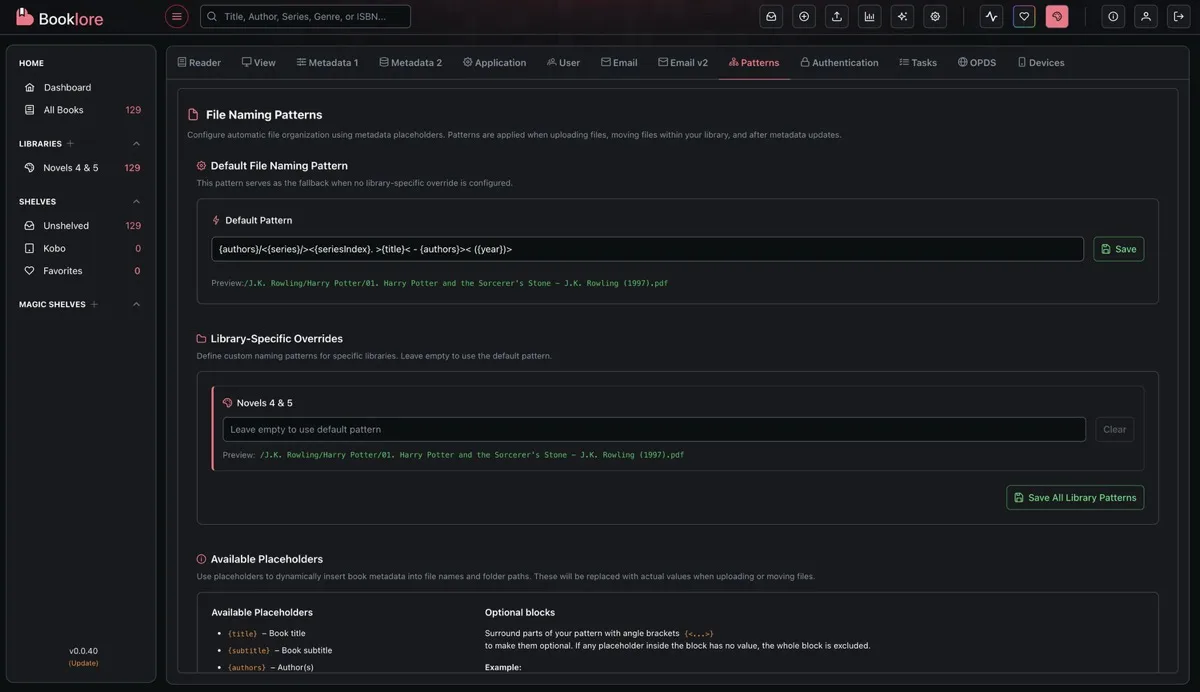
Configure automatic file organization using metadata placeholders. Patterns are applied when uploading books, finalizing Bookdrop imports, moving files between libraries, and (optionally) after metadata updates.
How Patterns Work
Section titled “How Patterns Work”Patterns are text templates with placeholders in curly braces. When a file is processed, Grimmory replaces each placeholder with the book’s actual metadata and renames/moves the file accordingly.
{authors}/{series}/{seriesIndex} - {title}Produces:
J.K. Rowling/Harry Potter/01 - Harry Potter and the Sorcerer's Stone.epubThe file extension is always added automatically.
Available Placeholders
Section titled “Available Placeholders”| Placeholder | Description | Example |
|---|---|---|
{title} | Book title | The Hobbit |
{subtitle} | Book subtitle | There and Back Again |
{authors} | Author name(s) | J.R.R. Tolkien |
{year} | Publication year | 1937 |
{series} | Series name | Middle-earth |
{seriesIndex} | Series position, zero-padded | 01 |
{language} | Language code | en |
{publisher} | Publisher name | Allen & Unwin |
{isbn} | ISBN (prefers ISBN-13) | 9780547928227 |
{currentFilename} | Original filename with extension | hobbit_original.epub |
Folder Structures
Section titled “Folder Structures”Use forward slashes to create nested folder structures:
{authors}/{series}/{seriesIndex} - {title}→ J.K. Rowling/Harry Potter/01 - Harry Potter and the Sorcerer's Stone.epubTrailing slash keeps the original filename:
{title}/→ Harry Potter and the Sorcerer's Stone/harry1_original.epubLeading slash creates an absolute path from the library root:
/{authors}/{title}→ /J.K. Rowling/Harry Potter and the Sorcerer's Stone.epubOptional Blocks
Section titled “Optional Blocks”Wrap parts of a pattern in angle brackets (<...>) to make them conditional. If any placeholder inside the block has no value, the entire block is removed.
<{seriesIndex} - >{title}- With series index:
01 - Dune.epub - Without series index:
Dune.epub
This is essential for metadata that may be missing, like series, subtitle, or ISBN.
Examples
Section titled “Examples”Subtitle block:
{title}<: {subtitle}>- With subtitle:
Project Hail Mary: A Novel.epub - Without:
Project Hail Mary.epub
Full series path with fallbacks:
{authors}/<{series}/><{seriesIndex}. >{title}- Full metadata:
Andy Weir/The Martian Series/02. Project Hail Mary.epub - No series:
Andy Weir/Project Hail Mary.epub
Decorative brackets:
<[{series}] >{title} - {authors}- With series:
[Harry Potter] Chamber of Secrets - J.K. Rowling.epub - Without:
Chamber of Secrets - J.K. Rowling.epub
Worked Examples
Section titled “Worked Examples”With Complete Metadata
Section titled “With Complete Metadata”Sample book: Harry Potter and the Sorcerer’s Stone by J.K. Rowling, Series: Harry Potter #1, Year: 1997, Original file: harry1_original.epub
| Pattern | Output |
|---|---|
{authors} - {title} | J.K. Rowling - Harry Potter and the Sorcerer's Stone.epub |
{authors}/{series}/{seriesIndex} - {title} | J.K. Rowling/Harry Potter/01 - Harry Potter and the Sorcerer's Stone.epub |
{title}/ | Harry Potter and the Sorcerer's Stone/harry1_original.epub |
{authors}/{series}/{currentFilename} | J.K. Rowling/Harry Potter/harry1_original.epub |
/{authors}/{title} | /J.K. Rowling/Harry Potter and the Sorcerer's Stone.epub |
With Missing Metadata
Section titled “With Missing Metadata”Sample book: Project Hail Mary by Andy Weir, Year: 2021, no series, no subtitle. Original file: project_hail_mary_final.epub
| Pattern | Output | What happened |
|---|---|---|
{authors}/<{series}/><{seriesIndex}. >{title}< ({year})> | Andy Weir/Project Hail Mary (2021).epub | Series and index blocks removed, year block kept |
<{seriesIndex}. >{title}< - {authors}> | Project Hail Mary - Andy Weir.epub | Index block removed |
<[{series}] >{title} - {authors} | Project Hail Mary - Andy Weir.epub | Brackets and series removed entirely |
{title}<: {subtitle}> | Project Hail Mary.epub | Subtitle block removed |
Configuration
Section titled “Configuration”Default Pattern
Section titled “Default Pattern”The default pattern applies to all libraries unless overridden. Set it in the Default File Naming Pattern section, then click Save. A live preview shows what the output would look like.
If no pattern is configured at all, files keep their original filename.
Library-Specific Overrides
Section titled “Library-Specific Overrides”Each library can have its own pattern. Leave a library’s pattern empty to inherit the default. Click Clear to remove an override.
Some useful per-library patterns:
| Library Type | Pattern |
|---|---|
| Comics/Manga | {series}/{seriesIndex} - {title} |
| Academic | {year}/{authors} - {title} |
| Audiobooks | {authors}/{title}/ |
| Fiction | {authors}/<{series}/><{seriesIndex}. >{title} |
| Multi-language | {language}/{authors}/{title} |
When Patterns Are Applied
Section titled “When Patterns Are Applied”- Uploads to a library
- Bookdrop imports when finalizing files into a library
- File moves between libraries or subfolders
- Metadata updates, if the “Auto-Move Files on Metadata Update” setting is enabled for that library