Notebook
The Notebook is a centralized view of all your highlights, notes, and bookmarks across every book in your library. Access it from the sidebar navigation.
Overview
Section titled “Overview”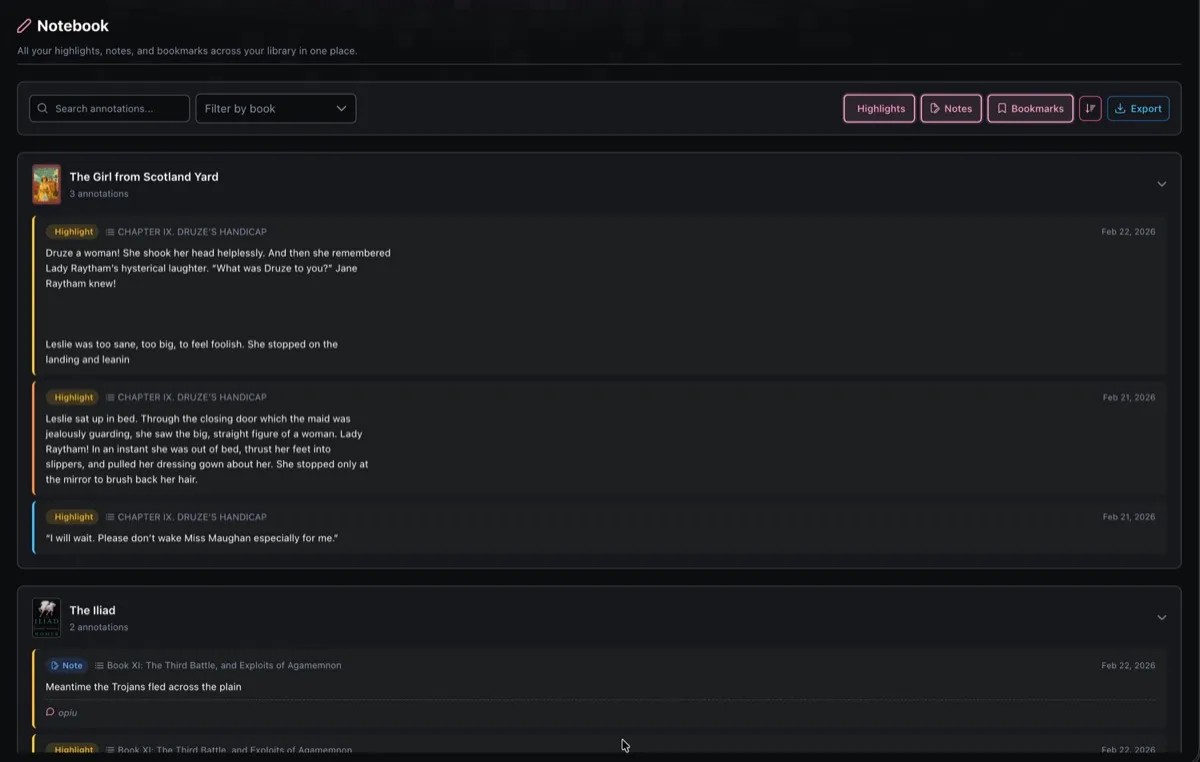
Annotations are grouped by book. Each book section shows a thumbnail, title, and annotation count, and can be collapsed or expanded. Individual entries display the annotation type (colored badge), chapter name, content, and creation date.
Annotation Types
Section titled “Annotation Types”| Type | Badge | Description |
|---|---|---|
| Highlight | Yellow | Text passages you highlighted in the EPUB reader |
| Note | Blue | Notes you attached to text in EPUB or comic readers |
| Bookmark | Green | Positions you bookmarked in any reader |
Filtering & Search
Section titled “Filtering & Search”The toolbar at the top offers several ways to narrow down your annotations:
- Search text input filters annotations by content (with a short debounce)
- Filter by book dropdown lets you scope to a single book
- Type toggles (Highlights, Notes, Bookmarks) can be toggled independently to show or hide each type
All filters can be combined. For example, show only highlights from a specific book that match a search term.
Sorting
Section titled “Sorting”A sort toggle switches between:
- Newest first (default) sorted by creation date descending
- Oldest first sorted by creation date ascending
Export
Section titled “Export”Click the Export button to download all matching annotations as a Markdown file (notebook-export.md). The export respects your active filters, so you can export just the highlights from one book, or everything at once.
The exported file includes:
- Entries grouped by book title
- Chapter headings where available
- Highlighted text in blockquote format
- Associated notes with a “Note:” prefix
The export button is disabled when there are no entries to export.
Pagination
Section titled “Pagination”Results are paginated with a default page size of 50. You can switch to 25 or 100 entries per page. The paginator only appears when total results exceed the page size.