Hardcover API Token Setup
Hardcover is a book tracking and discovery platform with rich metadata: covers, descriptions, community ratings, review counts, moods, and tags. To use it as a metadata provider in Grimmory, you need a free API token from your Hardcover account.
Get Your Token
Section titled “Get Your Token”- Sign up or log in at hardcover.app
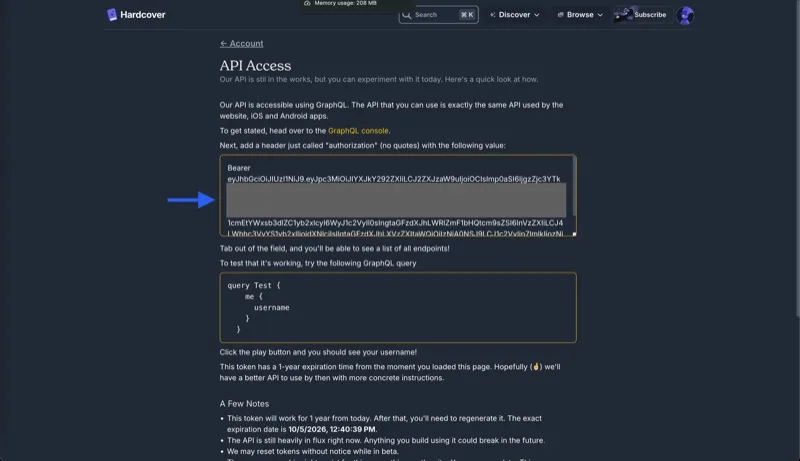
- Go to Account > API to open the API Access page
- Copy the token from the text box. It starts with
Bearerfollowed by a long string beginning witheyJ...
Configure Grimmory
Section titled “Configure Grimmory”- Open Settings > Metadata 1
- Enable the Hardcover checkbox
- Paste the token (without the
Bearerprefix) into the API Token field - Click Save
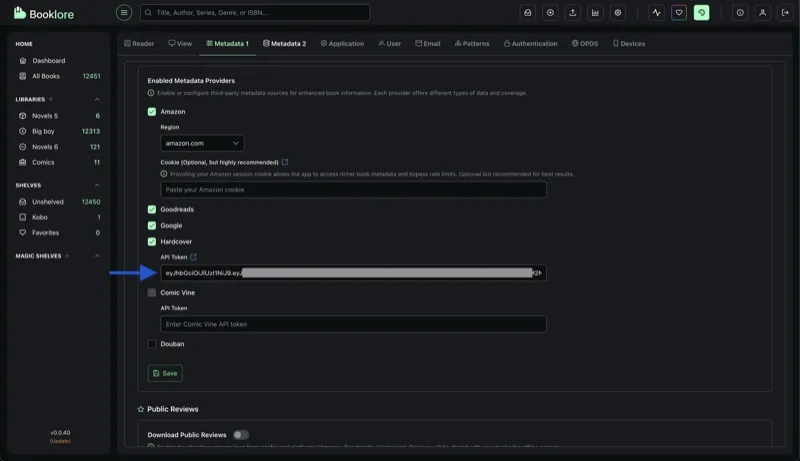
Hardcover is now active as a metadata provider. You can set its priority for individual fields in the Advanced Metadata Fetch dialog.
Troubleshooting
Section titled “Troubleshooting”| Problem | What to check |
|---|---|
| Authentication errors | Make sure you removed the Bearer prefix. Check for extra spaces at the start or end of the token. |
| Token stopped working | Hardcover tokens expire after 1 year. Go back to the API page and copy the new token. Hardcover may also reset tokens during their beta period. |
| No results for a book | Hardcover’s coverage is broad but not exhaustive. Verify the book exists on hardcover.app by searching manually. |